Answer the following Questions:
Ques 1. What is Adobe Photoshop? Describe the features of Adobe Photoshop.
Ans. Adobe Photoshop, popularly known as Photoshop, is a graphics editing program developed by Adobe System.
Features of Photoshop CS3 professional are:
a. Revised user-friendly interface.
b. Photo-editing or manipulation in lesser time with little efforts.
c. Create graphics for web applications with reduced file size.
d. Layer effects preserve the original state of an image while manipulating another version of it through another layer.
e. Crop or resize picture without losing quality of image.
f. Enhance or change the color of an image by adjusting the brightness, contrast and color balance, etc.
g. Remove the unwanted object from the picture by using Vanishing point tool.
h. With the new quick selection tool, users need to click and drag across an image to make fast selections.
Ques 2. Explain the use of Magic Wand Tool?
Ques 1. What is Adobe Photoshop? Describe the features of Adobe Photoshop.
Ans. Adobe Photoshop, popularly known as Photoshop, is a graphics editing program developed by Adobe System.
Features of Photoshop CS3 professional are:
a. Revised user-friendly interface.
b. Photo-editing or manipulation in lesser time with little efforts.
c. Create graphics for web applications with reduced file size.
d. Layer effects preserve the original state of an image while manipulating another version of it through another layer.
e. Crop or resize picture without losing quality of image.
f. Enhance or change the color of an image by adjusting the brightness, contrast and color balance, etc.
g. Remove the unwanted object from the picture by using Vanishing point tool.
h. With the new quick selection tool, users need to click and drag across an image to make fast selections.
Ques 2. Explain the use of Magic Wand Tool?
Ans. The Magic Wand Tool, simply known as the Magic Wand, is one of the oldest selection tool in Photoshop.
Unlike other selection tools that selects pixels in an image based on shapes or by detecting object edges, the Magic Wand select pixels based on tone and color.
Ques 3. What do you understand by cropping?
Ans. Cropping refers to remove parts of a digital image to retain a smaller section of the original.
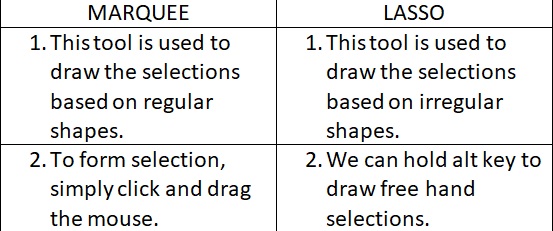
Ques 4. Differentiate between Marquee and Lasso Tool?
Ans.

Nice
ReplyDeleteNoice
ReplyDelete